Layouts
Definition
A Layout is a Vue Component that defines a Full-Page Layout and contains a <SpireContent/> Element where Pages will be rendered into. Like the following Example:
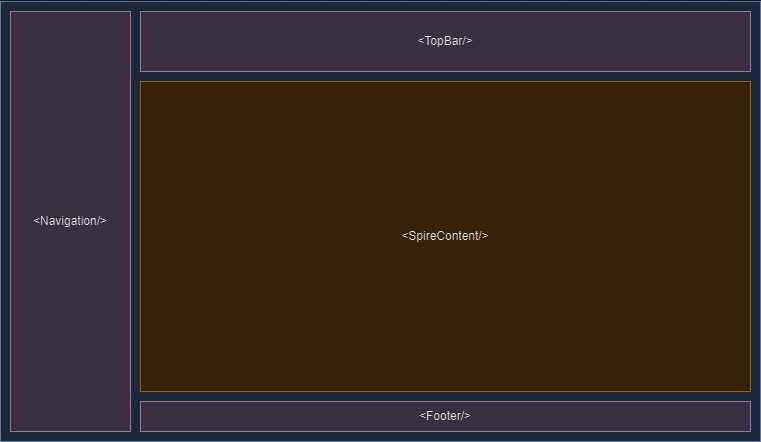
As a component, it would look like this:
<template>
    <section class="flex">
        <slot/>

        <AppNavigation class="flex-none w-[300px]"/>

        <section class="flex-1 h-screen flex flex-col items-stretch">
            <AppTopBar class="flex-none h-16"/>

            <main class="flex-1 overflow-y-auto">
                <SpireContent/>
            </main>

            <AppFooter class="flex-none h-8"/>
        </section>
    </section>
</template>
INFO
The <slot/> Element will ensure that whatever global components (like Modals, Toasts, etc.) you've defined in /ui/AppPage.vue will be rendered into this Layout. This is explicit since some Layouts might not want to render those components.
Usecases
There is a wide range of usecases for Layouts. While ofcourse certain Apps might get by with one or two Layouts it can be used quite creatively and adds another Layer to your UI that might come in handy.
Usecases:
- A "Fullscreen" Layout where you don't have render any navigation and/or headers
- Advanced Breakpoints through layouts - use different Layouts for different devices
- Authentication Views
- Error Views
- Landing-Pages
- etc.
Setting Layouts for Routes
The default way of using Layouts is via defining them in your routes and enabling the switchLayout Middleware in your Route Middleware Stack.
import AuthLayout from "@/ui/layouts/AuthLayout.vue"

route({
    name: "login",
    path: "/login",
    component: async () => import("@/ui/pages/Auth/LoginPage.vue"),
    layout: AuthLayout
})
Switching Layouts at Runtime
For more advanced usecases you might like to switch a Layout at runtime, like for adding an additional sidebar.
You can do this by using the setLayout() method from the toolkit.
import { setLayout, isActiveLayout } from "@/toolkit"
import AppLayout from "@/ui/layouts/AppLayout.vue"
import MyOtherLayout from "@/ui/layouts/MyOtherLayout.vue"

const toggle = () => {
    if(isActiveLayout(AppLayout)) {
        setLayout(MyOtherLayout)
    } else {
        setLayout(AppLayout)
    }
}